PlayerMadeQuests
Custom quest addon for WoW: Classic
Project maintained by runeberry Hosted on GitHub Pages — Theme by mattgraham
Start & Complete Objectives
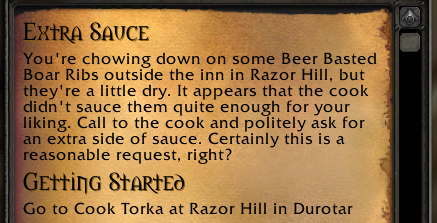 Quest description text and start block rendered as quest info |
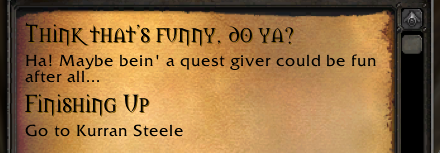 Quest completion text and complete block rendered as quest info |
By default, quests written in PMQ can be started anywhere in the world at any time, simply by selecting the quest from the catalog or by being invited from another player. Similarly, quests can be completed from anywhere by simply opening the quest once all objectives are completed and clicking “Complete Quest”.
But quests in WoW generally don’t operate this way - you’re usually required to talk to an NPC or interact with an object in order to start or complete a quest. To support this flow of gameplay, PMQ provides the start and complete conditions for quests.
start:
  zone: Elwynn Forest
  target: Marshal Dughan
complete:
  zone: Lion's Pride Inn
  target: Innkeeper Farley
What’s the difference?
Both properties support all the same parameters and are evaluated in the same way. The only difference is when they’re evaluated during a quest.
- start - What conditions are required before the player can accept the quest (click the “Accept” button)?
- complete - What conditions are required in order for the player to turn in the quest (click the “Complete Quest” button)?
Supported parameters
| Parameter | How it’s used |
|---|---|
| coords | The coordinates you must be at in order to start or complete the quest |
| target | The NPC that must be targeted in order to start or complete the quest |
| text | Custom display text for the start or complete condition |
| zone subzone |
The name of the zone and/or subzone where the quest starts or ends |
Display Text variables
| Variable | Parameter |
|---|---|
| %t | target |
| %z | zone |
| %sz | subzone |
| %co | coords |
| %x | x-coordinate of coords |
| %y | y-coordinate of coords |
| %r | radius of coords |
| %xy | coords formatted as: (x, y) |
| %xyr | coords formatted as: (x, y) +/- radius |