PlayerMadeQuests
Custom quest addon for WoW: Classic
Project maintained by runeberry Hosted on GitHub Pages — Theme by mattgraham
spell
The spell parameter lets you specify which spell(s) must be cast in order to complete an objective.
Value type
- String - The name of the spell (case-insensitive)
- Number - The ID of the spell
Note that regardless of whether you specify the name or ID of a spell in your quests, all spells with the same name will count towards objective completion. For example, whether you use name “Frostbolt” or the number 7322 as the spell in your quest, all ranks of Frostbolt will count towards objectives.
objectives:
  # Both of the following will support any rank of Frostbolt being cast
  - cast-spell:
      spell: frostbolt
  - cast-spell:
      spell: 7322
See the guide below for more info on how to get spells by name to use in your quests.
Supported objectives
| Objective | How it’s used |
|---|---|
| cast-spell | The spell you must cast |
Getting spells by name
PMQ requires you to provide valid in-game spells in all your quests; your quests will fail validation if any spell names or IDs cannot be found in-game. If you use valid spell IDs (numbers), then you should encounter no problems with looking up your spells. However, the WoW API has a peculiar limitation: you can only get spells by name if that spell is in your current spellbook. For example, if you try to reference the spell “Blessing of Might” by name while on a Hunter, the WoW API will tell you that this spell does not exist.
Fortunately, PMQ offers some solutions to work around this limitation so that you can reference any spells by name on any character.
- You can search for the spell on Wowhead and grab the spell’s ID from the URL, such as
spell=1234, where 1234 is the ID. Then, do one of two things:- Use the spell by ID in your quest, following the examples above. Keep in mind that any spell with the same name will count towards your objective, so you don’t need to worry about getting the ID of a specific rank of a spell. Any rank will work.
- You can also use the chat command
/pmq lookup-spell 1234, where 1234 is your spell ID. PMQ will now remember that spell’s name and you can reference it by name in your quests.
- If you want to avoid this problem in the future, run the command
/pmq scan-spells. This kicks off a process that will check for every known spell in the game and cache their names for future use in any quest draft on any character.- This process only takes about 2-3 minutes to run and may have a small effect on your game’s performance while it’s running. See Configuration for info on how to configure this scan.
Finally, you can erase all cached spell names from PMQ with the chat command /pmq clear-spells.
Discovering spells
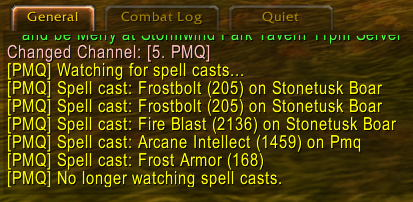
Toggle this feature on or off with: `/pmq watch-spells`
Many actions that your character performs in game are considered “spells” for the sake of gameplay and will work with this quest condition. Beyond your spellbook, things like Skinning, learning patterns, or using your Hearthstone are all considered spell casts.
Since it can be difficult to figure out exactly which spells you should put in your quests, PMQ provides a spell-watching tool that you can activate with the chat command /pmq watch-spells. When enabled, this will print a message containing the spell name, spell ID, and (if applicable) target name for every successful spell that your character casts. Simply enable scanning and then perform whatever action(s) you want to be part of your quest, and take note of the spells that it reports.
Spell watching only lasts for the current session and is turned off whenever you /reload or log out. To disable it yourself, simply enter the chat command again.