PlayerMadeQuests
Custom quest addon for WoW: Classic
Project maintained by runeberry Hosted on GitHub Pages — Theme by mattgraham
language
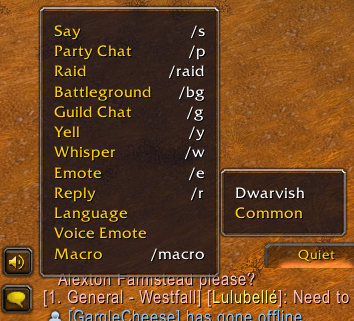 Left-click the speech bubble to select your spoken language |
 A character's language skills as listed in WoW: Classic |
The language parameter allows you to specify a Role-Playing language that a message must be spoken in when completing an objective.
In order to speak in a special language other than Common (Alliance default) or Orcish (Horde default), you must left-click the chat bubble icon on your chat frame, go to Languages, and select the language you want to speak in. Your character must have proficiency in a language in order to speak it. In WoW: Classic, you can see your character’s proficient languages under the Skills tab of the Character Info screen (default hotkey: K).
Value type
- String - the name of the language as it appears in-game. See the Language page on Wowpedia for all available options.
Supported objectives
| Objective | How it’s used |
|---|---|
| say | The language(s) that the message must be spoken in |
Usage notes
- The language value is case-sensitive, meaning that it must matching the casing as it appears in-game. For example, “Dwarvish” will work, but “dwarvish” and “DWARVISH” will not work.
- You cannot whisper another player in a different language, so don’t specify a language if the objective’s channel is “whisper”, or if you specify a message recipient.
- You can specify multiple languages, which means that sending the message in any one of these languages will satisfy the objective. For example:
objectives:
  - say:
      message: "wash yer back"
      language: [ Dwarvish, Gnomish ] # You can say this in either Dwarvish or Gnomish